[{"url":"/contact","name":"Customer Service","linkClass":null,"categoryCode":null},{"url":"/procurement-channels","name":"Direct Procurement","linkClass":null,"categoryCode":null},{"url":"/procurement-channels/open-catalog-interface","name":"OCI","linkClass":"active","categoryCode":null}]
The Open Catalog Interface (OCI) is a standardized, open catalog data interface. With it, you can use your own inventory management/ERP system exclusively in order to handle your WAGO purchasing processes and benefit from all the advantages of our webshop. In addition to SAP, many inventory management systems support this interface.
NEW: OCI can now also be used for direct ordering, depending on the configuration!
The Benefits for You:
- Completely digital recording of orders and order requests in your inventory management system
- Eliminates double recording
- Saves time and transaction costs by initiating the order immediately
- Error-free data transmission
- Follows internal processes
- Short implementation time thanks to standard interface
Ordering Has Never Been Easier
This video shows you how to use OCI, the Open Catalog Interface.
How Does OCI Work?
- From your order request, you can access the WAGO website directly with the corresponding button and will be logged in directly there.
- Once you have selected the products you want from the integrated webshop, you will see the following buttons in the shopping cart, depending on the configuration:
1. “Transfer via OCI“ (transfer the products into the order request)
2. “OCI Transfer and Ordering” (automatically order the products in the shopping cart)
- Your order is then placed either conventionally, via email or EDI*, or by direct order via OCI.
* Provided you have an active EDI connection with WAGO!
OCI Registration in Three Steps
1. Register on the WAGO website here.
2. Fill in the form below.
3. We will notify you as soon as we have enabled OCI for you. OCI only works with email addresses that have been enabled for it. We will also be happy to enable multiple email addresses for OCI. These must be registered on the WAGO website.
Configuration 1: Transfer via OCI
Step 1
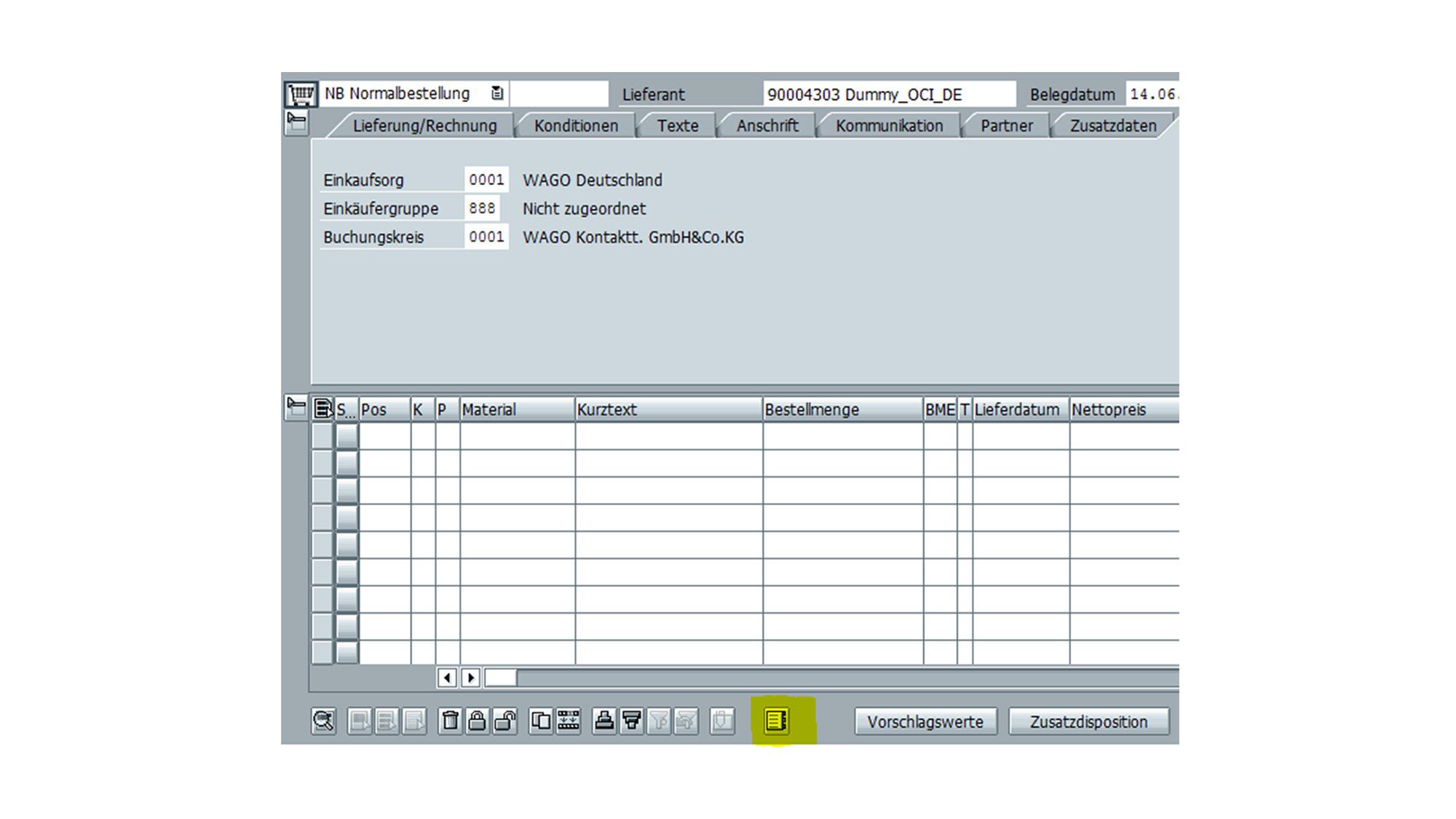
Open your order request (transaction ME21N/ME51N) and access the WAGO website via the catalog button.
The WAGO website opens in a browser window in SAP. You are logged in there directly and can use the integrated webshop.
Step 2
Select the desired items and place them in your shopping cart.
In the shopping cart, press the “Transfer via OCI” button and you will be taken back to your order request.
Step 3
The items from the shopping cart have been transferred to your purchase requisition.
You complete your data and then place your order manually via e-mail or EDI*.
*if you have an active EDI connection with WAGO
Configuration 2: Transfer and Order via OCI
Step 1
Open your order request (transaction ME21N/ME51N) and access the WAGO website via the catalog button.
The WAGO website opens in a browser window in SAP. You are logged in there directly and can use the integrated webshop.
Step 2
Select the desired items and place them in your shopping cart. In the shopping cart view, press the “OCI Transfer and Order” button.
This initiates the order directly!
Your contact person at WAGO
Additional service offerings: